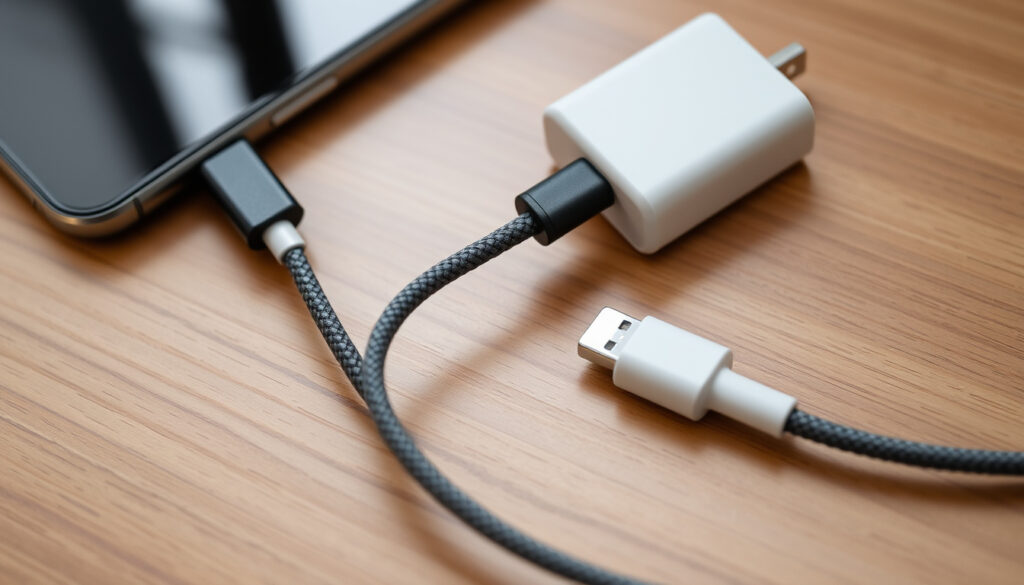
USB-C to Lightning Cable: Charging Guide & Best Picks
You’ve probably seen both ends of a charging cable and wondered why they don’t all look the same. The USB‑C to Lightning cable is the bridge between Apple’s old proprietary port and the universal standard that’s taking over laptops, tablets, and now iPhones.
Lightning connector introduced: 2012 · Devices with Lightning port shipped: over 1 billion · Maximum charging speed over USB‑C to Lightning (iPhone): 20 W (USB‑PD) · EU common charger mandate effective: 2024
Quick snapshot
- 1 m and 2 m lengths available (Apple Support cable compatibility page)
- MFi certified by design (Apple Support cable compatibility page)
- Premium price point (Apple Support cable compatibility page)
- MFi certification required for full compatibility (Anker MFi certification guide)
- Braided jackets available on many models (Anker MFi certification guide)
- Often more affordable than Apple’s cable (Anker MFi certification guide)
- Works with all iPhones from iPhone 8 onward (Qi standard)
- No cable wear
- Slower than wired fast charging
- Direct USB‑C connection, no adapter needed (Apple Support fast‑charge guidance)
- Supports faster charging with a compatible adapter (Apple Support fast‑charge guidance)
- Universal standard for future iPhones (Apple Support fast‑charge guidance)
Four cable families, one pattern: the right combination of cable + power adapter determines real‑world charging speed more than any brand name.
| Fact | Detail |
|---|---|
| Cable length options | 1 m, 2 m |
| Maximum charging speed (iPhone) | 20 W with USB‑PD |
| Compatible iPhones | iPhone 5 through iPhone 14 |
| MFi certification | Required for full functionality |
Do USB‑C to Lightning cables work?
Compatibility with iPhone models
- USB‑C to Lightning cables work with any iPhone that has a Lightning port—from iPhone 5 through iPhone 14 (Apple Support compatibility page).
- They also support data syncing with a USB‑C computer or adapter.
MFi certification requirement
- Apple’s MFi program (“Made for iPhone/iPad/iPod”) licenses accessory makers to ensure performance and safety (Apple MFi Program official site).
- Non‑certified cables may cause charging issues or fail to work at all (Apple Support warning about uncertified accessories).
- MFi certification covers safety and compatibility, not charging speed by itself (Alibaba Electronics MFi explanation).
Charging and syncing functionality
- When plugged into a USB‑C power adapter, the cable delivers power to the iPhone.
- Syncing requires either a USB‑C computer or a USB‑C to Lightning cable connected to a compatible USB‑C port.
Why is Apple getting rid of the Lightning cable?
EU common charger directive
- In 2022 the European Union passed a directive requiring a common charging port for small electronics by 2024 (reported by Apple Newsroom iPhone 15 announcement).
- Apple confirmed iPhone 15 would adopt USB‑C, complying with the regulation.
Universal adoption of USB‑C
- USB‑C is already used on MacBooks, iPads, and virtually all Windows laptops.
- Apple stated, “USB‑C is a universally accepted standard that makes charging and transferring data easier” (Apple Newsroom).
Consumer convenience and reduced e‑waste
- The European Commission said the common charger “will reduce e‑waste and make life easier for consumers” (2022 statement, cited by Apple Newsroom).
- One cable for many devices means fewer chargers end up in landfills.
What are the disadvantages of the Lightning connector?
Charging speed limitations
- Lightning supports a maximum of 20 W charging via USB‑PD (Apple Support fast‑charge guidance). USB‑C can deliver up to 240 W on laptops and tablets.
- Apple’s own fast‑charge data: iPhone can charge up to 50 % in about 30 minutes with a 20 W adapter or higher (Apple Support).
Proprietary nature and cost
- Lightning is Apple’s proprietary standard; accessory makers pay licensing fees to join the MFi program (Apple MFi Program official site).
- This raises the cost of certified cables compared to open standards.
Durability and connector wear
- The Lightning connector’s exposed pins can accumulate debris over time.
- Users report fraying near the connector on both Apple and third‑party cables.
Lightning’s biggest drawback is its 20 W ceiling—enough for a fast iPhone top‑up but inadequate for the high‑power charging modern laptops require.
What is the best USB‑C to Lightning cable?
Apple official cable
- Apple sells its own USB‑C to Lightning cable in 1 m and 2 m lengths (Apple Support cable compatibility page).
- It is MFi certified by default and works seamlessly with Apple chargers.
Top third‑party MFi certified brands
- Anker offers braided MFi cables that support the same 20 W charging as Apple’s (Anker MFi certification guide).
- Belkin and Nomad also produce premium MFi certified options with extra durability.
- Encased markets an “ultra fast‑charging” MFi cable for certain iPhone models (Encased MFi cable product page).
Key factors: length, braiding, warranty
- Length: 2 m cables offer more reach; 1 m is more portable.
- Braided nylon jackets resist fraying better than standard rubber.
- Warranty periods vary: Apple offers 1 year, Anker up to 18 months.
For most users, the best cable is an MFi certified braided cable from Anker or Belkin—cheaper than Apple’s, equally fast, and more durable.
Three popular cables, one key difference: only the MFi certified ones guarantee full compatibility.
| Feature | Apple Official | Anker (MFi certified) | Non‑MFi / unknown |
|---|---|---|---|
| MFi certified | Yes | Yes | Usually no |
| Braided jacket | No | Yes | Varies |
| Max charge power (iPhone) | 20 W | 20 W | May be limited |
| Length options | 1 m, 2 m | 0.9 m, 1.8 m, 3 m | Varies |
| Warranty | 1 year | 18 months | Often none |
How can I charge my iPhone without a Lightning cable?
Wireless charging with Qi pads
- All iPhones from iPhone 8 onward support Qi wireless charging (up to 7.5 W).
- No cable wear, but charging is slower than wired fast charging.
Using a USB‑C to USB‑C cable (iPhone 15 and later)
- iPhone 15 models charge directly via USB‑C to USB‑C cable (Apple Newsroom).
- This eliminates the need for a Lightning cable entirely.
MagSafe charging
- MagSafe offers faster wireless charging up to 15 W for iPhone 12 and later.
- It uses magnets to align the charger, reducing energy loss.
Using a non‑MFi USB‑C to Lightning cable may trigger a “This accessory may not be supported” warning and could damage your battery over time.
Steps to fast‑charge your Lightning iPhone with a USB‑C to Lightning cable
- Purchase an MFi certified USB‑C to Lightning cable.
- Use a USB‑C power adapter rated at 20 W or higher (Apple Support).
- Plug the USB‑C end into the adapter, the Lightning end into your iPhone (iPhone 8 or later).
- You should see the charge level reach 50 % in about 30 minutes.
Timeline signal: the end of Lightning and rise of USB‑C
- 2012 – Apple introduces the Lightning connector with iPhone 5 (Apple Newsroom iPhone 5 announcement).
- 2023 – Apple releases iPhone 15 with USB‑C, beginning the transition (Apple Newsroom).
- 2024 – EU common charger directive takes effect in member states.
- 2025+ – Lightning accessory sales expected to decline; Apple may eventually stop selling Lightning cables.
Confirmed facts
- iPhone 15 uses USB‑C instead of Lightning.
- EU directive requires USB‑C for small electronic devices by 2024.
- Apple continues to sell USB‑C to Lightning cables for older devices.
What’s unclear
- Exact date when Apple will cease production of Lightning cables.
- Whether future iPads will all switch to USB‑C (some iPad models still use Lightning).
Expert voices on the transition
“USB‑C is a universally accepted standard that makes charging and transferring data easier.”
— Apple press release, September 2023 (Apple Newsroom)
“The common charger will reduce e‑waste and make life easier for consumers.”
— European Commission spokesperson, 2022 statement
The two quotes highlight a shared goal: making charging simpler across devices while cutting down on electronic waste. The implication: users holding Lightning-equipped iPhones should now plan their next cable purchase knowing the standard is sunsetting.
For anyone still relying on a Lightning iPhone, the takeaway is practical: a quality MFi certified USB‑C to Lightning cable paired with a 20 W adapter delivers the fastest possible charge for your device. When you upgrade to an iPhone 15 or later, that same cable becomes obsolete—but the adapter will still work with a standard USB‑C cable. For iPhone users in 2024, the choice is clear: keep your Lightning device running with a good cable, or plan for a future where USB‑C is the only port you need.
For a deeper look at compatibility and performance, check this USB-C to Lightning cable guide covering key features and MFi certification tips.
Frequently asked questions
Can I use a USB‑C to Lightning cable with an iPhone 6?
Yes, the iPhone 6 has a Lightning port and works with USB‑C to Lightning cables. However, fast charging requires an iPhone 8 or later.
Does a USB‑C to Lightning cable charge faster than a standard USB‑A to Lightning cable?
Yes, when paired with a USB‑C power adapter that supports USB‑PD (20 W+), it can charge an iPhone up to 50 % in 30 minutes, much faster than a standard 5 W USB‑A charger.
Are all USB‑C to Lightning cables the same?
No. MFi certified cables guarantee compatibility and safety. Non‑certified cables may charge slowly or trigger warning messages.
Will my Lightning accessories work with a USB‑C iPhone using an adapter?
You can use Apple’s Lightning to USB‑C Adapter to connect Lightning accessories to an iPhone 15, but performance may vary.
How do I know if a USB‑C to Lightning cable is MFi certified?
Look for the “Made for iPhone” logo on the packaging, or check the manufacturer’s product description for MFi certification.
What happens if I use a non‑certified USB‑C to Lightning cable?
You may see an “This accessory not supported” alert, and charging speed may be limited. Apple warns it could also damage your device (Apple Support warning).
Is it safe to charge my iPhone with a USB‑C to Lightning cable overnight?
Modern iPhones manage battery charging intelligently; once full, they trickle charge. Using a certified cable and adapter is safe for overnight charging.
More related posts
 Bec Hewitt 2025: Still Married? Life Now, Home, and Family
 Robbie Amell: Family, Career & Roles in The Flash, Upload
 David Boon: Test Hero, Beer Legend, and ICC Referee
 Audie Murphy: Most Decorated WWII Hero’s Life and Death
 Maple Social Club Daytime Sydney Events: Dates & Tickets
 Black Cat Meaning: Superstitions, Catholic Church, and Facts
 Son of Sardaar 2 – Release Date, Cast & Plot Details
 Ayatollah Khomeini: Biography of Iran’s First Supreme Leader
